2016년 6월 29일 수요일

How to Modify Network Speed and Duplexing


Instructions

To modify network speed and duplexing, complete the following procedure:
  1. Run the following command to find the physical interface where you need to apply the settings:
    # xe pif-list host-uuid=<host_uuid>
    Note: xe pif-list command lists all the physical interfaces from all hosts in the pool. It is required to filter the interfaces by “host-uuid” if you need to find the right interface.
  2. Review current physical interface settings:
    # xe pif-list uuid=<UUID of physical interface> params=all
  1. Run the following command to set speed, duplex, and auto-negotiation:
    # xe pif-param-set uuid=<UUID of physical interface> other-config:ethtool-autoneg=off other-config:ethtool-speed=1000 other-config:ethtool-duplex=full
    Note: Turn off auto-negotiation before setting the speed manually.
  1. Apply the setting on the interface. 
  2. Unplug and plug the physical interface:
    Note: You do not need to unplug and plug the interface as follows. If you are unable to unplug the interface and skip the following step, then the settings will be applied after the next reboot.
    # xe pif-unplug uuid=<UUID of physical interface>
    # xe pif-plug uuid=<UUID of physical interface>
    Or
    Restart the host:
    # xe host-reboot host=<hostname>

2016년 6월 23일 목요일

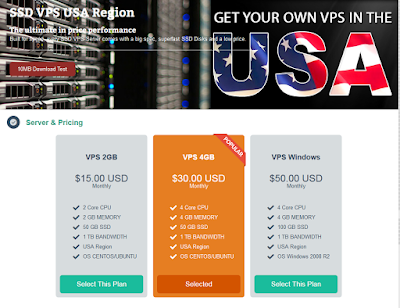
VPS in USA

VPS in USA
Just Launched the VPS in USA.
Please, visit and order it. It is easiest way to get a server.

visit at https://www.netdedi.com/index.php?/cart/ssd_vps_usa/

2016년 6월 21일 화요일

Resetting the Device to Factory Defaults : Netscreen Device


Resetting the Device to Factory Defaults
 If you lose the admin password, or you need to clear the configuration of your device, you can reset the device to its factory default settings.
Resetting the device destroys any existing configurations and restores access to the device. You can restore the device to its default settings using one of these methods: „ Using the device serial number „ Using the CLI unset all command „ Using the Reset Config pinhole button The following sections describe how to use these methods to reset the device to its factory defaults.
Device Serial Number To use the device serial number to reset the device to its factory defaults:
1. Start a Console session as described in “Using a Console Connection” on page 30.
2. At the Login prompt, enter the device serial number.
3. At the Password prompt, enter the serial number again. The following message appears: !!! Lost Password Reset !!! You have initiated a command to reset the device to factory defaults, clearing all current configuration and settings. Would you like to continue? y/[n]
CAUTION: Resetting the device deletes all existing configuration settings and disables all existing firewall and VPN services.
NOTE: By default, the device recovery feature is enabled. You can disable it by entering the CLI unset admin device-reset command. Also, if the security device is in FIPS mode, the recovery feature is automatically disabled. Resetting the Device to Factory Defaults „ 43 Configuring the Device

4. Press the y key. The following message appears: !! Reconfirm Lost Password Reset !! If you continue, the entire configuration of the device will be erased. In addition, a permanent counter will be incremented to signify that this device has been reset. This is your last chance to cancel this command. If you proceed, the device will return to factory default configuration, which is: device IP: 192.168.1.1; username: netscreen, password: netscreen. Would you like to continue? y/[n] 5. Press the y key to reset the device. The system now resets and returns to the login prompt; the default login name and password are both reset to netscreen

To use the CLI unset all command, you will need to know the login name and password. To reset the device to its factory defaults:
1. Start a Console session as described in “Using a Console Connection” on page 30, then log in.
2. At the command prompt, enter unset all. The following message is displayed: Erase all system config, are you sure y/[n] ?
3. Press y
4. Enter reset.
Press n for the first question and y for the second question: Configuration modified, save? [y]/n
System reset, are you sure? y/[n]
 The system now resets and returns to the login prompt; the default login name and password are both reset to netscreen.

2016년 6월 15일 수요일

Amazon Web Services outage causes Austrialian Website chaos


http://www.smh.com.au/technology/technology-news/amazon-web-services-outage-causes-australian-website-chaos-20160605-gpc41p.html

shoppers were left unable to pay for trolleys full of groceries, while websites and servers crashed around the nation in a spate of technical outages on Sunday.
Amazon Web Services, which hosts cloud computing services for many companies, listed a number of connectivity issues for its services based in Sydney. It is not yet known whether the storms that lashed Sydney over the weekend were responsible.
Some of the websites affected include those belonging to Fairfax Media, publisher of this website; Foxtel and Fox Sports; car sharing service Go Get; The Daily Telegraph's NRL Super Coach site; Nine and Fairfax-owned online streaming platform Stan; ticketing platform TryBooking; and online food ordering service Menulog.

Amazon Web Services' status dashboard lists a number of connectivity issues for its services based in Sydney.
Meanwhile, a separate technical outage caused numerous financial services including debit cards, ATMs and Eftpos machines  to fail on Sunday night. 
Advertisement
An AWS spokesman said the problem was not related to the website issues with Amazon Web Services. 
Customers from Westpac, Commonwealth Bank and ME Bank complained on the companies' Facebook pages, with some saying their eftpos payments did not work.
One person said he had to leave a trolley full of groceries in Aldi because his card did not work. 
A Commonwealth Bank spokeswoman said the bank was not aware of any systemic issues, but some individuals may be experiencing intermittent issues with other eftpos machines.


Read more: http://www.smh.com.au/technology/technology-news/amazon-web-services-outage-causes-australian-website-chaos-20160605-gpc41p.html#ixzz4BhlWkSdF 
Follow us: @smh on Twitter | sydneymorningherald on Facebook

VPS Hosting Package is right for you.

VPS Package is launched!!
You can build your network easily.
If you need more resources, please, contact us.
visit at https://www.netdedi.com

Starter Package 15

$15.00 USD

 Starter Package 15

$15.00 USD
 
 Monthly
  • CPU 2 Cores
  • MEMORY 2 GB
  • SSD DISK 20GB
  • 1 Public IP Address
  • 1 TB BANDWIDTH
  • Build up to 2 Starter T1
  • NAT within Your Network
  • Load Balancing
  • Inbound/Outbound Firewall
  • VPN Service
  • Snapshots
  • Additional Storage
  • Port Forwarding

Business Package25

$25.00 USD
Monthly
  • CPU 3 Cores
  • MEMORY 3 GB
  • SSD DISK 40GB
  • 1 Public IP Address
  • 1 TB BANDWIDTH
  • Build Up to 3 T1
  • NAT within Your Network
  • Load Balancing
  • Inbound/Outbound Firewall
  • VPN Service
  • Snapshots
  • Additional Storage
  • Port Forwarding
 https://www.netdedi.com/index.php?/cart/vps-package/ 


WordPress product Launched!!

Create an unforgettable website

netdedi.com powers beautiful websites for businesses, professionals, and bloggers
Please, visit at  


2016년 6월 9일 목요일

VPS Package Launched!!

VPS Package is launched!!
You can build your network easily.
If you need more resources, please, contact us.
visit at https://www.netdedi.com

Starter Package 15

$15.00 USD
Monthly
  • CPU 2 Cores
  • MEMORY 2 GB
  • SSD DISK 20GB
  • 1 Public IP Address
  • 1 TB BANDWIDTH
  • Build up to 2 Starter T1
  • NAT within Your Network
  • Load Balancing
  • Inbound/Outbound Firewall
  • VPN Service
  • Snapshots
  • Additional Storage
  • Port Forwarding

Business Package25

$25.00 USD
Monthly
  • CPU 3 Cores
  • MEMORY 3 GB
  • SSD DISK 40GB
  • 1 Public IP Address
  • 1 TB BANDWIDTH
  • Build Up to 3 T1
  • NAT within Your Network
  • Load Balancing
  • Inbound/Outbound Firewall
  • VPN Service
  • Snapshots
  • Additional Storage
  • Port Forwarding